.png "The Vested Group | NetSuite Solution Provider Partner | NetSuite Consulting | NetSuite Support")

Integrating artificial intelligence (AI) into NetSuite can streamline processes and boost efficiency, but it requires a robust strategy and technical roadmap. When implemented correctly, AI transforms NetSuite from a system of record to a system of action. Before implementing AI-powered automation into your NetSuite system, you must identify the ideal workflows to focus on and master an AI4 NetSuite deployment framework.
What AI Workflow Automation Means for NetSuite Users
NetSuite workflow automation enables your team to move data, trigger approvals and flag anomalies without human touch. Implementing AI business processes within NetSuite transitions employees from manually entering data to managing the exceptions that the system flags.
Scripts vs. AI
It's important to distinguish between standard scripting and AI when using NetSuite. This distinction helps you and your team understand precisely what you are buying or building.
Standard scripts or SuiteScript prompts follow rigid, rules-based logic. For example, if an invoice is over a certain amount, the system sends it the CFO for approval. AI and machine learning add an additional layer that analyzes patterns and anomalies. For example, if an invoice from a certain vendor is 35% higher than their average monthly bill, the system flags it for review.
This shift from rigid logic to adaptive pattern recognition is the core of NetSuite process efficiency. It enables the system to handle nuances that static workflows cannot.
Native Features vs. Custom Integrations
NetSuite is rapidly integrating AI features into its native ecosystem. For example, NetSuite Text Enhance and Bill Capture are native tools that use AI to draft content or read incoming PDF invoices, significantly boosting productivity.
However, deep AI workflow implementation often requires custom integrations via an application programming interface (API). This may involve connecting NetSuite to external AI models that can predict potential supply chain disruptions.
High-Impact Use Cases for AI-Driven Business Processes
Once your team understands the purpose and advantages of AI-powered workflow automation in NetSuite, the next step is determining where to apply this technology. Start by identifying high-volume, rules-heavy operational areas where it's easiest to measure the return on investment (ROI) of automating processes.
Automating Financial Processes in NetSuite
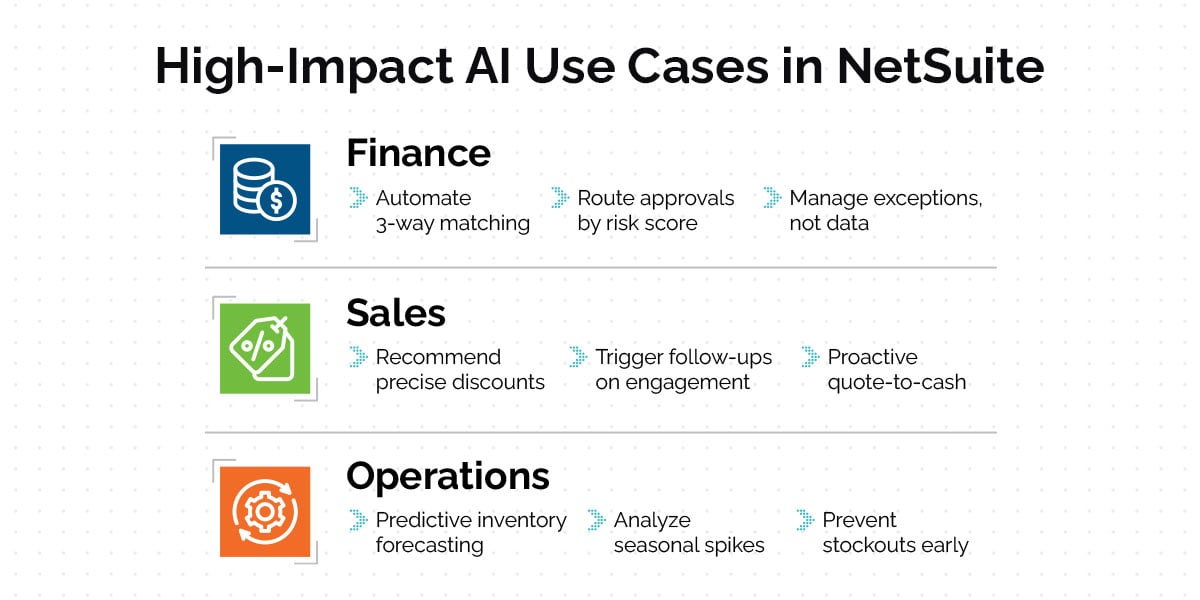
For most organizations, the finance department is the ideal testing ground for NetSuite automation use cases. Accounts Payable is especially ripe for improvement because it involves repetitive document matching, which is a task that AI technology excels at optimizing.
AI-driven AP automation moves beyond simple optical character recognition (OCR). An intelligent workflow can scan incoming invoices, match them against purchase orders and item receipts, and execute automatic three-way matches.
Standard automation matches exact numbers, which can disrupt the workflow if there is even a slight variance. AI automation understands acceptable variance thresholds and can auto-approve standard variances while flagging significant outliers for human review. This shifts the workflow from managing every single bill and order to only managing the exceptions. AI-powered approval workflows in NetSuite can also route bills based on risk scores rather than just dollar amounts, allowing your system to pay vendors faster.
Removing Friction From the Deal in Sales
Sales workflow automation in NetSuite is often underutilized because many teams tend to use enterprise resource planning (ERP) workflows for final order entry. However, AI can transform NetSuite into a proactive sales engine.
For example, consider a quote-to-cash workflow where AI analyzes historical deal data. Rather than a sales representative guessing a discount, the AI-powered system can recommend the precise discount threshold that has historically maximized win rates for similar customers.
AI automation can also trigger follow-up tasks based on engagement signals. For example, the system can alert an account manager to intervene if a high-value prospect hasn't opened a quote in three days. This helps sales teams focus more time on closing.
Developing Supply Chain Resilience in Operations
Implementing AI automation in NetSuite is critical for efficient operations and inventory management. Traditional reorder points are static and don't account for seasonality or market shifts until an employee manually updates them.
NetSuite operations automation steps change this by enabling predictive inventory forecasting. AI technology analyzes historical sales trends, seasonal spikes and lead time variability to predict stockouts weeks before they occur.
Step-by-Step NetSuite Workflow Setup
Trying to automate a chaotic process only accelerates complications. A disciplined, step-by-step NetSuite workflow setup can help you develop an organized process for greater efficiency and accuracy:
1. The Audit Phase
The audit phase is a critical planning phase also known as Phase Zero. You can only automate what you understand, so it's vital to map your current manual workflows step-by-step. This allows your team to identify redundancies, bottlenecks and shadow processes before touching the software.
NetSuite business process automation must begin with data hygiene because AI models require clean, consistent data for correct functioning. If your historical data is full of errors, duplicates or incomplete records, an AI model learns to replicate these errors at scale. Beginning with a clean, consistent system helps ensure the AI model replicates the correct data and patterns.
2. Selection and Architecture
Once you clean your data and map your processes, you must determine the architecture. Does your team plan to implement a native SuiteFlow, or do you require an external AI integration?
Native SuiteFlow is ideal for internal approvals, email triggers and field updates. External integration is necessary for heavy data lifting, predictive analytics or connecting to third-party AI platforms, such as OpenAI or Amazon Web Services (AWS) Machine Learning. Defining the logic is the core of this phase, because every workflow must follow a clear structure:
- Trigger or input: What starts the process? For example, maybe the start is a new lead creation.
- Intelligence or analysis: What logic does the system apply? If the trigger is a new lead creation, the logic might be comparing the lead's industry to the ideal customer profile.
- Action or output: What happens next? Determine what you want the system to accomplish. For example, you might set it up to assign leads to the appropriate sales representatives based on certain criteria.
3. Sandbox Testing
It's important to build and rigorously test all NetSuite automation use cases in a sandbox environment before moving on to production. Test the paths where everything goes right, as well as the failure paths. Ensure that the workflow fails safely, alerting an administrator rather than halting operations or corrupting data.
4. Deployment and Training
Implementing AI automation in NetSuite requires thorough training and trust in the system. Introduce new workflows in phases. You can start with one department or one specific transaction type and add new workflows as users become confident in the updated processes.
Why You Need a Partner for Advanced NetSuite Automation
While a savvy NetSuite administrator can often handle simple approvals, AI workflow implementation usually hits a technical ceiling. True predictive automation often requires advanced expertise in SuiteScript 2.x, RESTlets and external API configurations that are beyond the scope of standard administrative training. The GURUS AI Chatbot for NetSuite is a helpful tool within the software, but you need an experienced partner to guide you through system complexities.
The Vested Group offers an approach focused on strategic alignment, identifying the most beneficial processes to automate and evaluating how each option serves your long-term business goals. We use Phase Zero methodology to ensure that every automation we build safeguards your operations.
Streamline Your Processes With Expert Guidance
AI-powered workflow automation can fundamentally transform your business, turning your passive ERP database into an active driver of efficiency. The Vested Group has the knowledge and experience to help you identify the best areas to automate and implement a plan that streamlines your processes. Contact us to schedule a demo, or learn more about our NetSuite Support services to discover how we can optimize your current system with a comprehensive roadmap.