.png "The Vested Group | NetSuite Solution Provider Partner | NetSuite Consulting | NetSuite Support")
A NetSuite optimization roadmap is a structured, prioritized plan that guides how your organization improves and evolves its NetSuite environment after go-live — drawing from user feedback, ticket data, business goals, and platform release notes to sequence improvements by business impact. Without one, enhancement requests accumulate in email threads and spreadsheets, reactive support crowds out strategic improvement work, and the ERP gradually falls out of alignment with the business it is supposed to serve. Organizations that build and maintain a roadmap consistently extract more long-term value from their NetSuite investment than those that operate without one.
Going live with NetSuite is a major milestone. But it is not the finish line. The organizations that extract the most value from their ERP investment are those that treat implementation as the beginning of an ongoing optimization journey — not a one-time project with a defined end date.
A structured NetSuite roadmap gives your team a shared framework for identifying, prioritizing, and delivering improvements over time. Without one, enhancement requests pile up without resolution, competing departments argue over limited resources, and the system gradually drifts away from the needs of the business. With one, your team knows what is coming, why decisions were made, and how the system will continue to evolve.
This post walks through how to build and maintain a NetSuite optimization roadmap that actually gets used.
Why Companies Need a Roadmap After Go-Live
During implementation, the focus is on getting to go-live. Requirements are scoped, configurations are made, and a functional system is delivered. But the first version of any ERP is never the final version. Users interact with the system in real conditions and discover friction. Business processes change. The company grows into new markets, adds entities, or acquires other businesses. New NetSuite features are released twice per year. Integrations with third- party tools evolve.
Without a roadmap, all of that change creates noise. Requests accumulate in email threads and spreadsheets. Some get addressed reactively during support tickets. Others are forgotten entirely. The team never has a clear picture of what is actually planned, what has been deprioritized, or what has been deferred and why.
A roadmap solves this by creating a structured, visible, regularly maintained view of where the system is headed and how it will get there.
What Inputs Feed the Roadmap
A good roadmap is not built from guesswork or executive preferences alone. It draws from multiple sources of real data about how the system is performing and where the gaps are:
- User feedback: Front-line staff know where the system creates friction better than anyone. Structured surveys, department walkthroughs, and informal conversations surface issues that never make it into a formal ticket.
- Ticket data: Support tickets and enhancement requests reveal patterns. If five different users from three departments have submitted requests about the same workflow, that is a signal worth acting on.
- Operational metrics: Close cycle time, transaction error rates, data entry volumes, and approval bottlenecks can all point to areas where the system is underperforming.
- Audit findings: Internal audits and external reviews often surface control gaps, access issues, or documentation deficiencies that require system changes.
- NetSuite release notes: NetSuite publishes two major releases per year. Reviewing release notes proactively allows your team to identify new features that could address existing pain points before users even ask.
- Business plans: Strategic initiatives — new product lines, geographic expansion, acquisitions — all carry system implications. The roadmap should reflect where the business is going, not just where it has been.
- Integration logs: Errors, timeouts, and data mismatches in integration logs often indicate underlying configuration issues that will only get worse without attention.
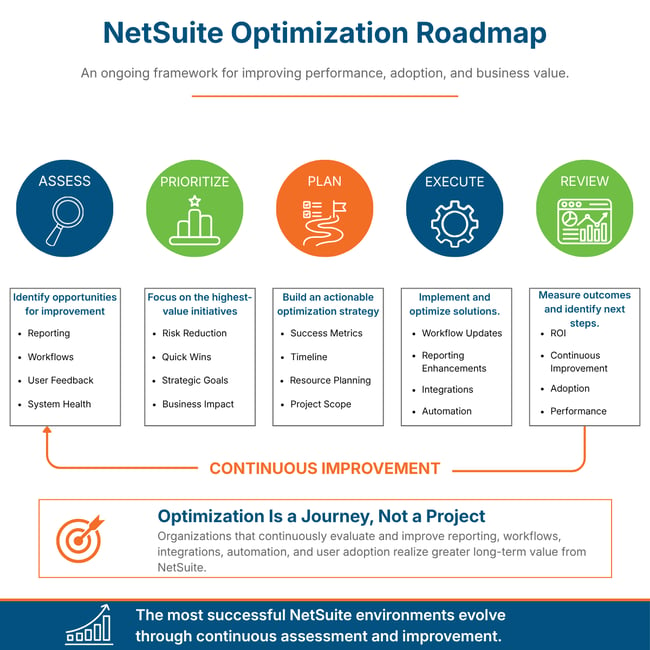
Step 1: Assess Current Friction
Before you can prioritize improvements, you need to understand the current state of the system from the people who use it every day. This means going beyond the executive layer and talking directly with front-line users across departments.
Schedule structured walkthroughs with each major department — Finance, Operations, Sales, Customer Service, IT. Ask open-ended questions about where the system slows them down, where they have built workarounds, and what they wish the system could do differently. Document what you hear without filtering it through assumptions about what is or is not possible.
After gathering this input, look for patterns. When multiple users from different departments describe the same type of friction, that is a high-confidence signal. When a workaround has become so normalized that users no longer think of it as a workaround, that is a sign the system has drifted from its intended design.
Combine user feedback with data from your support ticket history, integration logs, and operational metrics to build a complete picture of where the system stands today.
Step 2: Categorize Improvement Opportunities
Once you have a list of potential improvements, categorize them so you can plan across different types of work. A useful set of categories includes:
- Configuration changes: Adjustments to existing NetSuite settings, fields, forms, or workflows that do not require scripting.
- Process redesign: Cases where the business process itself needs to change, and the system configuration follows from that change.
- Automation: Workflows, alerts, or saved searches that reduce manual effort and improve consistency.
- Reporting and analytics: New reports, dashboards, KPIs, or data structures that improve visibility.
- Integration enhancements: Changes to how NetSuite connects with other systems, including new integrations or improvements to existing ones.
- Compliance and controls: Changes driven by audit findings, regulatory requirements, or access control reviews.
- Platform upgrades: Adoption of new NetSuite features, modules, or capabilities released by Oracle.
Categorization helps you balance the roadmap. If every item in the queue is a reporting request, other categories may be underrepresented. If all items are large platform projects, quick wins may be getting overlooked.
Step 3: Prioritize by Business Impact
Not every improvement is equal, and capacity is always limited. A five-dimension scoring model provides a consistent, defensible way to compare opportunities across departments and types of work:
- Operational risk: What happens if this is not addressed? Does it create compliance exposure, data integrity issues, or customer-facing risk?
- Time savings: How much manual effort does this improvement eliminate? Across how many users and how frequently?
- Reporting impact: Does this improvement affect the accuracy, timeliness, or completeness of financial or operational reporting?
- User impact: How many users are affected, and how significantly does this change their daily experience?
- Strategic value: Does this improvement support a key business initiative or enable a capability the organization needs to grow?
Score each opportunity on each dimension — a simple 1 to 5 scale works well — and calculate a weighted total. The weights themselves can be adjusted to reflect organizational priorities. A company in a heavy audit environment might weight compliance risk more heavily. A company in a growth phase might weight strategic value higher.
Document the scoring criteria and weights so that prioritization decisions are transparent and repeatable. This becomes especially important when departments disagree about what should come first.
Step 4: Balance Quick Wins and Larger Initiatives
An effective roadmap includes both quick wins and larger, more complex initiatives — and it sequences them deliberately.
Quick wins matter for several reasons. They demonstrate that the roadmap process delivers real results, not just plans. They build confidence among front-line users that their feedback is being heard. They reduce friction in areas that are creating daily pain. And they are often low- risk, making them appropriate candidates for the early phases of a new roadmap cycle.
Larger initiatives matter because some of the most significant value opportunities in NetSuite cannot be delivered incrementally. Redesigning a core business process, standing up a new integration, or adopting a major new module requires sustained effort over multiple sprints. These items need space on the roadmap even if they take longer to deliver.
A useful sequencing approach is to pair each larger initiative with related quick wins that can be delivered while the larger work is underway. This keeps the team delivering visible value even during periods of heavy investment in longer-horizon work.
Step 5: Review Regularly
A roadmap that is reviewed once and then shelved is not a roadmap — it is a wish list. Regular review cycles keep the roadmap current and ensure it remains a living tool rather than a historical artifact.
A monthly triage process works well for managing new intake. As new requests come in, they are evaluated against the scoring criteria, categorized, and added to the backlog or prioritized into an upcoming quarter. Monthly triage prevents the backlog from becoming unmanageable and ensures nothing sits unreviewed for long.
A quarterly planning process is appropriate for roadmap-level decisions: what moves from backlog into active planning, what gets deferred, what has changed in business priorities that should shift the order of work. Quarterly planning also provides a natural checkpoint to review progress against what was planned.
Communicate roadmap updates broadly. Stakeholders across the business should know what is in progress, what is coming next, and what has been deferred. Transparency reduces the pressure of individual department requests and replaces it with a shared understanding of how the system will evolve.
How to Handle Competing Priorities Across Departments
One of the most common challenges in roadmap management is competing requests from different departments. Finance needs a reporting change by month-end. Operations needs a workflow fix before the busy season. Sales needs an integration update before the next campaign. All of it feels urgent.
The answer is not to pick winners and losers informally. That approach creates resentment, reduces trust in the process, and often results in the loudest voice winning rather than the highest-value item moving forward.
A cross-functional governance group — sometimes called a NetSuite steering committee — provides a structured forum for these decisions. This group should include representation from each major department that uses the system, a named decision-maker, and a defined escalation path for items the group cannot resolve. The group reviews prioritization decisions against the scoring criteria and makes recommendations that are based on business impact rather than departmental politics.
Transparent criteria are essential. When every stakeholder understands how decisions are made, it is easier to accept an outcome even when their item was not the top priority. "Your request scores a 3.2 on the prioritization model; the item ahead of it scores a 4.1 because it carries compliance risk" is a conversation that departments can accept. "We decided to do that one first" is not.
Common Mistakes in Roadmap Planning
Five mistakes appear repeatedly in organizations that struggle to make their roadmap process work:
- Treating it as a wish list rather than a plan: A roadmap requires resource estimates, sequencing, and accountability. A list of desired features without those elements is not a plan — it is a backlog that will never be worked.
- Skipping end-user input: Roadmaps built entirely from executive priorities miss the friction that matters most to the people doing the work. Front-line input is not optional — it is a required input.
- Ignoring capacity: The roadmap must reflect what the team can actually deliver. Overloading the roadmap with more work than the team can handle in a quarter creates a credibility problem when delivery falls short.
- Failing to link items to business outcomes: Every item on the roadmap should have a clear connection to a business result — time savings, risk reduction, revenue enablement, or compliance. Items that cannot be linked to an outcome should be questioned.
- Abandoning the process after the first session: A roadmap is not a one- time deliverable. Organizations that build a roadmap and then stop maintaining it quickly revert to reactive, uncoordinated system management.
How Managed Services Drive and Support the Roadmap
Building and maintaining an optimization roadmap requires ongoing expertise, structured process, and dedicated capacity. For many organizations, that combination is difficult to sustain internally — especially when internal resources are already stretched across daily support and operational responsibilities.
A managed services partner contributes to the roadmap process in several ways. Proactive surfacing is one of the most valuable: a partner with deep NetSuite expertise reviews release notes, monitors system health, and brings improvement opportunities to the table before users have to ask. This shifts the roadmap from reactive to proactive.
The inVESTED PRO managed services structure from The Vested Group is built around this model. Rather than simply responding to tickets, inVESTED PRO includes structured roadmap reviews, proactive health monitoring, and a defined process for surfacing and prioritizing improvements. Clients have access to senior NetSuite expertise without the overhead of building that capability entirely in-house.
Client Spotlight
AI Inside NetSuite: Real Implementations Across Eight Companies
While many organizations treat AI in ERP as a future consideration, a growing number of companies have already deployed AI-powered capabilities directly inside NetSuite. These implementations span professional services, insurance, cloud technology, and marketing — covering use cases from automated bank reconciliation and intelligent chart of accounts restructuring to real-time AI connectors that move data between systems without manual intervention.
Across these engagements, the consistent finding is that practical AI implementation in NetSuite requires both technical integration expertise and business process clarity. Organizations that invest in structured onboarding — including on-site training and well-defined automation scope — see significantly stronger adoption and measurable reduction in manual processing time. AI in NetSuite is not a roadmap item. For these companies, it is already operational.
Industries: Professional Services, Insurance, SaaS, Marketing | Outcome: AI-powered automation deployed across finance and operations workflows
Frequently Asked Questions
What is a NetSuite optimization roadmap?
A NetSuite optimization roadmap is a structured, living document that captures improvement opportunities across the ERP environment, prioritizes them by business impact, and sequences them into a delivery plan. It distinguishes between quick wins and larger initiatives, reflects input from multiple stakeholders and data sources, and is reviewed on a defined cadence — typically monthly for triage and quarterly for planning. A roadmap is not a wish list; it requires resource estimates, sequencing, and clear accountability.
How often should we review our NetSuite roadmap?
A monthly triage cadence works well for managing new intake — evaluating incoming requests, categorizing them, and adding them to the backlog or prioritizing them into an upcoming quarter. A quarterly planning process is appropriate for roadmap-level decisions: what moves from backlog into active planning, what gets deferred, and what has changed in business priorities. Communication of roadmap updates should happen broadly so all stakeholders know what is in progress, what is coming next, and what has been deferred.
Who should be involved in building a NetSuite roadmap?
A NetSuite roadmap requires input from multiple layers of the organization. Front-line users across Finance, Operations, Sales, and Customer Service provide the friction data that no executive view captures. Department leaders provide context on strategic priorities and business changes. IT or your managed services partner provides technical feasibility and effort estimates. A cross-functional governance group — sometimes called a NetSuite steering committee — is responsible for making final prioritization decisions based on this combined input.
How do we prioritize items on a NetSuite roadmap?
A five-dimension scoring model provides a consistent, defensible prioritization approach. Score each opportunity on operational risk, time savings, reporting impact, user impact, and strategic value — each on a simple 1 to 5 scale — and calculate a weighted total. The weights can be adjusted to reflect organizational priorities; a company in a heavy audit environment might weight compliance risk higher than a company focused on growth. Document the scoring criteria and weights so that prioritization decisions are transparent and repeatable.
What inputs should feed a NetSuite improvement roadmap?
A well-built roadmap draws from user feedback gathered through structured department walkthroughs, ticket and enhancement request history, operational metrics such as close cycle time and error rates, audit findings, NetSuite release notes, business strategy plans, and integration logs. Roadmaps built only from executive preferences miss the friction that matters most to front-line users, while roadmaps built only from user requests may not reflect the organization's strategic direction.
What are the most common mistakes in NetSuite roadmap planning?
The five most common mistakes are: treating the roadmap as a wish list rather than a plan with resource estimates and accountability; skipping front-line user input in favor of executive priorities; overloading the roadmap with more work than the team can actually deliver in a quarter; failing to link roadmap items to measurable business outcomes; and abandoning the process after the first session rather than maintaining it as a living tool. Organizations that avoid these mistakes consistently deliver more visible, sustained value from their roadmap process.
How does a managed services partner support NetSuite roadmap planning?
A managed services partner contributes to roadmap planning in ways that are difficult to replicate internally. Proactive surfacing of improvement opportunities — based on release note review, system health monitoring, and cross-client pattern recognition — means the roadmap includes items the client team has not yet identified. Effort estimation, technical feasibility assessment, and delivery execution are all provided without requiring the client to maintain that depth of expertise internally. inVESTED PRO from The Vested Group includes structured roadmap reviews as a core component of the managed services model.
Start Building Your Roadmap Today
The best time to start a NetSuite optimization roadmap was at go-live. The second best time is now. If your organization is managing enhancement requests informally, reacting to problems rather than preventing them, or struggling to get cross-departmental alignment on system priorities, a structured roadmap process will change that.
The Vested Group works with NetSuite customers at every stage of their post- implementation journey. Whether you are starting your first roadmap or improving an existing process, our team can help you build a framework that delivers consistent value. Contact us to learn more about inVESTED PRO and how it supports continuous optimization for your business.

Joseph Lang
Joseph Lang is the Director of inVESTED PRO at The Vested Group. With more than 13 years of NetSuite experience, he helps organizations maximize the value of their ERP investment through strategic guidance, operational improvements, and ongoing managed services. Joseph specializes in NetSuite optimization, manufacturing, warehouse management, inventory management, procurement, and SuiteCommerce, helping clients continuously improve their business processes and long-term ERP performance.